* Facade Pattern
Facade : 어떤 기능을 처리하기 위해 여러 객체들 사이의 복잡한 메서드 사용을 감춰 단순화시켜주는 패턴
ex) 데이터 조회 후 출력하는 기능 : Cache 조회, DBMS 조회, Cache 입력, 조회 결과 가공, 가공 결과 출력의 메서드를 각 객체에서 진행.
이때 Facade Pattern을 적용하면 각 객체 및 메서드를 파악하지 않고 Facade 클래스 하나로 단순화 가능.
<Facade Pattern 적용 전>
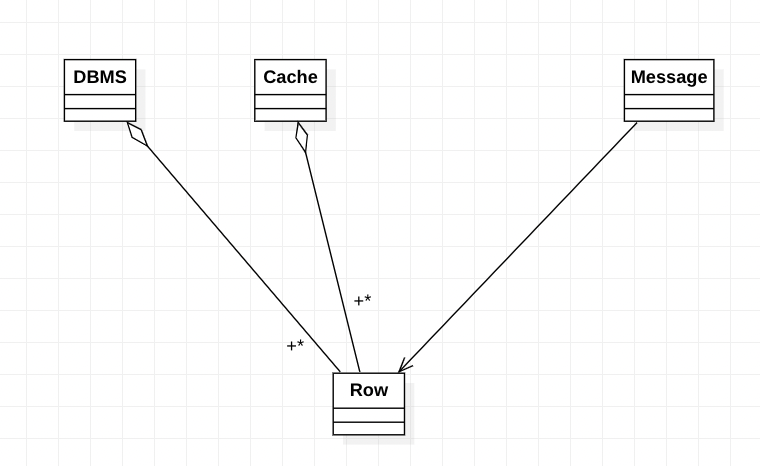
DBMS에 저장되는 데이터 Row 클래스
public class Row { // DBMS 에 저장된 데이터
    private String name;
    private String birthday;
    private String email;

    public Row(String name, String birthday, String email) {
    	this.name = nane;
        this.birthday = birthday;
        this.email = email;
    }

    public String getName() {
    	return name;
    }

    public String getBirthday() {
    	return birthday;
    }

    public String getEmail() {
    	return email;
    }
데이터가 저장돼있는 DBMS 클래스. 데이터를 저장하는 메서드(query)가 있다.
public class DBMS {
    private HashMap<String, Row> db = new HashMap<String, Row>(); // key: Row 클래스 객체의 이름 필드.

    public DBMS() { // db 필드에 데이터 조금 추가 (실습을 위해)
    	db.put("jane", new Row("Jane", "1990-02-14", "jane09@naver.com"));
        db.put("tom", new Row("Tom", "1995-08-18", "tomom@naver.com"));
    }

    publid Row query(String name) {
    	return db.get(name.toLowerCase());
    }
}
DBMS에서 조회한 데이터를 임시 저장하는 Cache 클래스.
public class Cache { // DBMS에서 조회된 데이터를 임시로 저장하는 클래스. 속도 향상을 위해!
    private HashMap<String, Row> cache = new HashMap<>();

    public void put(Row row) {
    	cache.put(row.getName(), row);
	}

    public Row get(String name) {
    	return cache.get(name);
    }
}
Row 클래스를 가공하는 Message 클래스
public class Message {
    private Row row;

    public Message(Row row) {
    	this.row = row;
    }

    public String makeName() {
    	return "Name: \"" + row.getName() +"\"";
    }

    public String makeBirthday() {
    	return "Birthday: " + row.getBirthday();
    }

    public String makeEmail() {
    	return "Email: " + row.getEmail();
    }
}
지금까지 만든 클래스를 활용
데이터를 조회하고 출력할 때까지 여러 개의 객체를 사용함. 이런 여러 가지 사항들을 Facade Pattern을 사용해 단순화할 수 있음.
public class MainEntry{

    public static void main(String[] args) {
    	DBMS dbms = new DBMS();
        Cache cache = new Cache();

        String name = "Tom";

        Row row = cache.get(name);
        if(row == null) {
        	row = dbms.qury(name);
            if(row != null) {
            	cache.put(row);
            }
        }

        if(row != null) {
        	Message message = new Message(row);

            System.out.println(message.makeName());
            System.out.println(message.makeBirthday());
            System.out.println(message.makeEmail());
        } else {
        	System.out.println(name + " is not exist.");
        }
    }
}
<Facade Pattern 적용>
Facade 가 클래스들과 관계를 맺어 연결.
Row, Message: Facade에서 클래스를 사용.
DBMS, Cache : Facade의 필드에 추가.
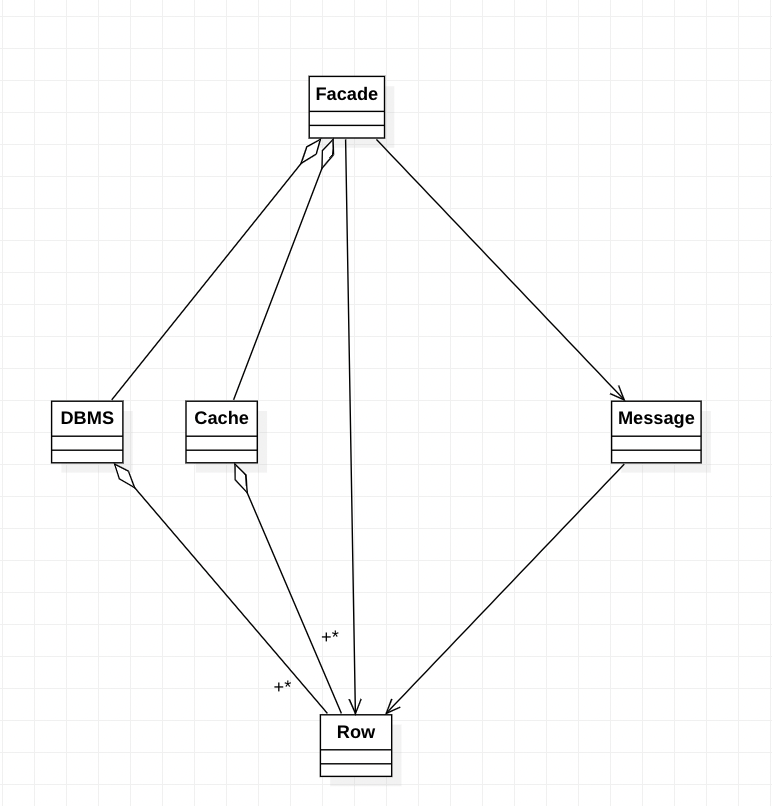
public class Facade {
    private DBMS dbms = new DBMS();
    private Cache cache = new Cache();

    public void run(String name) {
    	Row row = cache.get(name);
        if(row == null) {
        	row = dbms.qury(name);
            if(row != null) {
            	cache.put(row);
            }
        }

        if(row != null) {
        	Message message = new Message(row);

            System.out.println(message.makeName());
            System.out.println(message.makeBirthday());
            System.out.println(message.makeEmail());
        } else {
        	System.out.println(name + " is not exist.");
        }
    }
MainEntry 가 매우 간략해진다.
public class MainEntry{

    public static void main(String[] args) {

    Facade facade = new Facade();

    String name = "Tom";

    facade.run(name);
}
이 패턴은 프리코스 진행할 때 자주 사용한 것 같다.
Controller에서 모든 구현을 run() 메서드에 담아 둔 후 Application 에선 Controller의 run 매서드만 호출했었다.
따로 이름이 있는 패턴이었구나!
'코딩 > Software Architecture' 카테고리의 다른 글
| [GoF Design Pattern] Memento (0) | 2022.12.05 |
|---|---|
| [GoF Design Pattern] Builder (0) | 2022.12.04 |
| [GoF Design Pattern] Flyweight (0) | 2022.12.04 |
| [GoF Design Pattern] Command (0) | 2022.12.04 |
| [GoF Design Pattern] Prototype (0) | 2022.12.03 |


