* Flyweight
Flyweight: 객체를 사용하기 위해 매번 생성하지 않고 한 번만 생성 후 다시 필요할 때 이전에 생성된 객체를 사용
객체 생성에 많은 자원을 소모하는 경우, Flyweight를 사용해 훨씬 적은 자원으로 객체 재사용
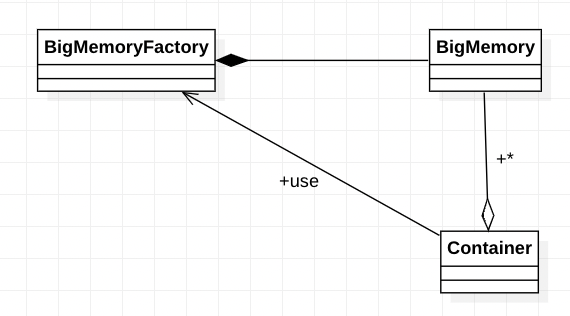
BigMemory: 생성될 때 정해진 하나의 파일을 오픈하고 데이터를 읽어 메모리에 적재한 뒤 출력하는, 큰 메모리를 사용함
예시) Digit : 0~9의 숫자를 화면에 출력하는데 큰 메모리를 사용.
BigMemoryFactory: 원하는 파일에 대한 BigMemory 객체를 반환(전달), 요청 시 매번 객체 생성해서 반환하는 게 아니라, 처음 요청 시 한번 생성하고 이후에 동일 요청 시 이전 생성한 객체 반환. 리스트에 객체를 저장해 두고 꺼내 반환. (리스트를 사용)
예시) DigitFactory : 원하는 숫자에 대한 Digit 객체를 요청하면 반환. 그 방식은 위와 동일.
Container: BigMemory객체를 가지고 있는 클래스(?)
예시) Number : 긴 숫자 값을 화면에 출력하는 기능. 긴 숫자 값에 대한 Digit 객체를 DigitFactory를 사용해 구성
파일을 열어 데이터를 읽어오고 출력.
여기서 파일은 8줄로 이루어진 문장.
public class Digit {
    private ArrayList<String> data = new ArrayList<>();

    public Digit(String fileName) {
    	FileReader fr = null;
        BufferedReader br = null;
        try {
        	fr = new FileReader(fileName);
            br = new BufferReader(fr);

            for(int i=0; i<8; i++) {
            	data.add(br.readLine());
            }
        } carch(IOException e) {
        	e.printStackTrace();
        } finally {
        	try{
            	if(fr != null) fr.close();
                if(br != null) br.close();
            } catch (IOException e) {
            	e.printStackTrace();
            }
        }
    }

    public void(int x, int y) {
    	for(int i=0; i<8; i++) {
            String line = data.get(i);
        	System.out.print(String.format("%c[%d;%df",0x1B,y+i,x));
    		System.out.print(line);
        }
    }
}
원하는 숫자에 대한 Digit 객체를 요구하면 반환하는 클래스.
파일 이름이 '. /data/3'의 형식이다.
public class DigitFactory {
    public Digit[] pool = new Digit[] {
    	null, null, null, null, null, null, null, null, null, null
    };

    public Digit getDigit(int n) {
    	if(pool[n] != null) {
        	return pool[n];
        }
        String fileName = String.format("./data/%d.txt", n);
        Digit digit = new Digit(fileName);
        pool[n] = digit;
        return digit;
    }
}
DigitFactory를 통해 Digit 객체를 가져와 출력해야 할 Digit List를 만드는 클래스.
파라미터로 숫자를 받으면, 그 숫자에 해당하는 Digit 객체를 리스트에 담는 생성자를 가지고 있다.
public class Number {
    private ArrayList<Digit> digitList = new ArrayList<Digit>();

    public Number(int number) {
    	String strNum = Integer.toString(number);
        int len = strNum.length();

        DigitFactory digitFactory = new DigitFactory();
        for(int i=0; i<len; i++) {
        	int n = Character.getNumbericValue(strNum.charAt(i));
            Digit digit = digitFacroty.getDigit(n);
            digitList.add(digit);
        }
    }

    public void print(int x, int y) {
        int cntDigits = digitList.size();
        for(int i=0; i<cntDigits; i++) {
        	Digit digit = digitList.get(i);
            digit.print(x+(i*8), y);
        }
    }
}
Flyweight Pattern을 사용해 복잡한 문자 출력.
public class MainEntry {
    public static void main(String[] args) {
    	Number number = new Number(434331);
        number.print(5,5);
    }
}
'코딩 > Software Architecture' 카테고리의 다른 글
| [GoF Design Pattern] Builder (0) | 2022.12.04 |
|---|---|
| [GoF Design Pattern] Facade (0) | 2022.12.04 |
| [GoF Design Pattern] Command (0) | 2022.12.04 |
| [GoF Design Pattern] Prototype (0) | 2022.12.03 |
| [GoF Design Pattern] Proxy (0) | 2022.12.02 |


