* Abstract Factory Pattern
Abstract Factory : 추상적인 것들을 만드는 공장.
Abstract Factory Pattern : 먼저 만들어야 할 컴포넌트들을 추상적으로 정하고 어떤 구체적인 상황이 주어지면 각 컴포넌트들을 구체적으로 만드는 패턴
예) Button, CheckBox, TextEdit 버튼 기능이 있어야 하는데, OS에 따라 구현이 다름. (만들어야 할 컴포넌트를 추상적으로 정의)
이때 각 운영체제에 따라 각 버튼의 기능을 구체적으로 구현. (구체적인 상황이 주어지면 추상적인 컴포넌트를 구체적으로 생성)
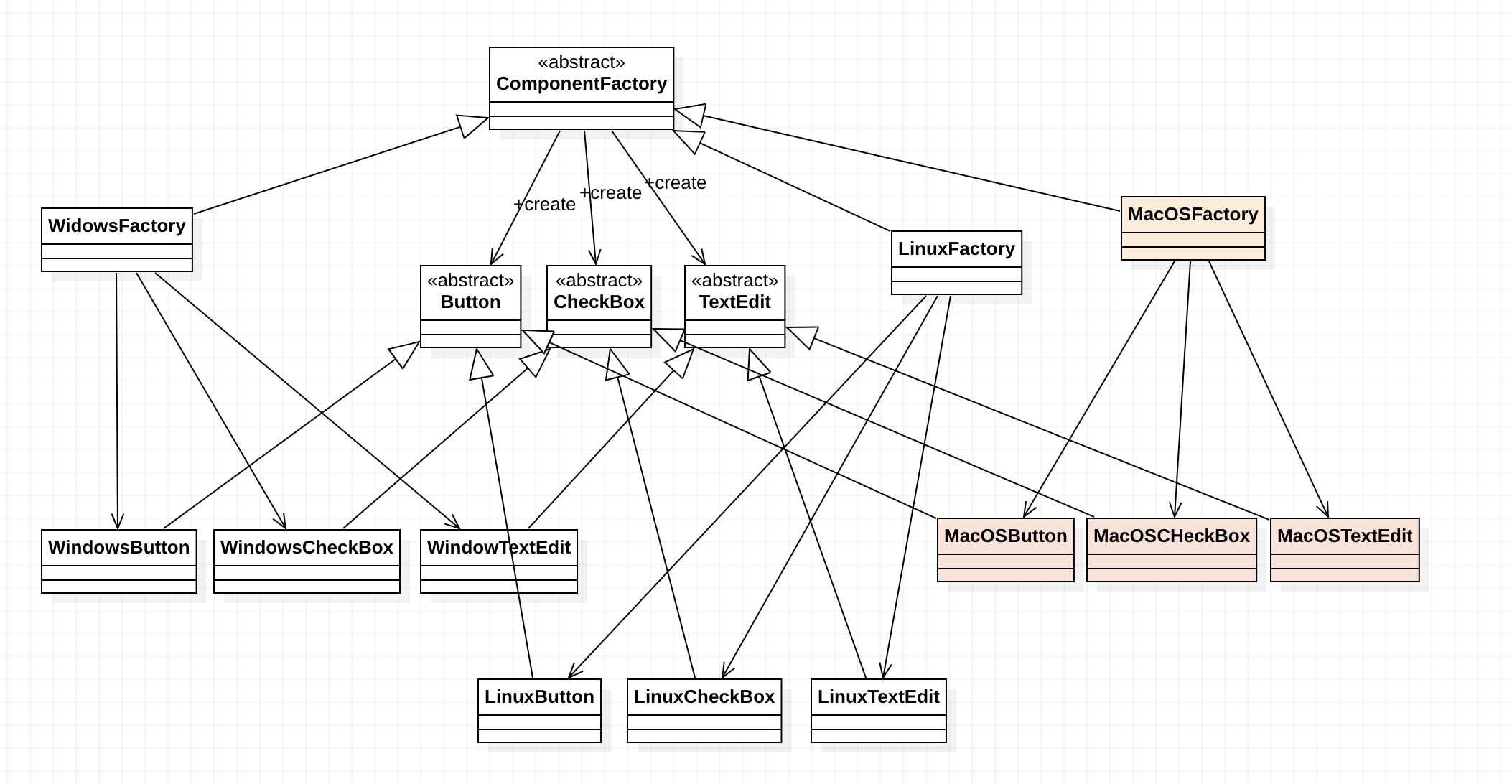
ComponentFactory : 추상적인 컴포넌트를 만들어내는 공장. (추상 클래스)
Button, CheckBox, TextEdit: 만들 추상적인 컴포넌트. (추상 클래스)
WindowFactory, LinuxFactory : 구체적인 공장. 각 이름 운영체제에 맞는 Factory가 사용됨.
각 컴포넌트들은 (WindowButton, LinuxCheckBox 등) 각 추상 컴포넌트를 상속받아 Factory에서 생성.

Component의 추상 클래스들.
운영체제와 상관없는 Component의 구체적인 기능은 메서드로 작성하고,
운영체제에 따라 변하는 기능은 추상 메서드로 작성.
public abstract class Button {
    protected String caption;

    public Button(String caption) {
    	this.caption = caption;
    }

    public void clickEvent() {  // 운영체제와 상관없는 메서드
    	System.out.println(caption + " 버튼을 클릭했습니다.");
    }

    abstract void render(); // 화면상 컴포넌트 그리는 메서드
}
public abstract class CheckBox {
protected boolean bChecked;
public CheckBox(boolean bChecked) {
this.bChecked = bChecked;
}
void setChecked(boolean bChecked) {
this.bChecked = bChecked;
render();
}
abstract void render();
}public abstract class TextEdit {
protectec String value;
public TextEdit(String value) {
this.value = value;
}
public void setValue(String value) {
this.value = value;
render();
}
public abstract void render();
}컴포넌트를 생성하는 추상 클래스. 현재는 추상 메서드만 가지고 있어 인터페이스로 바꿔도 괜찮음.
public abstract class ComponentFactory {
    public abstract Button createButton(String caption);
    public abstract CheckBox createCheckBox(boolean bChecked);
    public abstract TextEdit createTextEdit(String value);
}
Component를 상속받아 구체적으로 구현하는 클래스들.
Botton
public class WindowsButton extends Button {

    public WindowButton(String caption) {
    	super(caption);
    }

    @Override
    void render() {
    	System.out.println(
            "Windows 렌더링 APT를 이용해"
            + this.caption
            + "버튼을 그립니다.");
        }
}
public class LinuxButton extends Button {
public LinuxButton(String caption) {
super(caption);
}
@Override
void render() {
System.out.println(
"Linux 렌더링 APT를 이용해"
+ this.caption
+ "버튼을 그립니다.");
}
}CheckBox
public class WindowsCheckBox extends CheckBox {

    public WindowCheckBox(boolean bChecked) {
    	super(bChecked);
    }

    @Override
    void render() {
    	System.out.println(
            "Windows 렌더링 APT를 이용해"
            + (this.bChecked ? "체크된" : "체크 안된")
            + "체크 박스를 그립니다.");
        }
}
public class LinuxCheckBox extends CheckBox {
public LinuxCheckBox(boolean bChecked) {
super(bChecked);
}
@Override
void render() {
System.out.println(
"Linux 렌더링 APT를 이용해"
+ (this.bChecked ? "체크된" : "체크 안된")
+ "체크 박스를 그립니다.");
}
}TextEdit
public class WindowsTextEdit extends TextEdit {

    public WindowTextEdit(String value) {
    	super(value);
    }

    @Override
    void render() {
    	System.out.println(
            "Windows 렌더링 APT를 이용해"
            + this.value + " 값을 가진"
            + "텍스트에디트를 그립니다.");
        }
}
public class LinuxTextEdit extends TextEdit {
public LinuxTextEdit(String value) {
super(value);
}
@Override
void render() {
System.out.println(
"Linux 렌더링 APT를 이용해"
+ this.value + " 값을 가진"
+ "텍스트에디트를 그립니다.");
}
}ComponentFactory를 상속받아 구체적인 Component를 생성하는 각 운영체제의 Factory
public class WindowsFactory extends CompnentFactory {

    @Override
    public Button createButton(String caption) {
        return new WindowsButton(caption);
    }

    @Override
    public CheckBox createCheckBox(boolean bChecked) {
        return new WindowsCheckBox(bChecked);
    }

    @Override
    public TextEdit createTextEdit(String vaule) {
        return new WindowsTextEdit(valie);
    }
}
public class LinuxFactory extends CompnentFactory {
@Override
public Button createButton(String caption) {
return new LinuxButton(caption);
}
@Override
public CheckBox createCheckBox(boolean bChecked) {
return new LinuxCheckBox(bChecked);
}
@Override
public TextEdit createTextEdit(String vaule) {
return new LinuxTextEdit(valie);
}
}작성한 클래스를 활용해 main에서 사용
public class MainEntry {

    public static void main(String[] args) {
        // 운영체제가 변경되면 factory 생성 시 운영체제를 바꾸면 됨.
        ComponentFactory factory = new WindowsFactory();

        // 운영체제에 대한 코드 없이 component 생성 가능
        Button button = factory.createButton("확인");
        CheckBox checkBox = factory.creatCheckBox("false");
        TextEdit textedit = factory.creatTextEdit("디자인패턴");

        // 운영체제에 대한 코드 없이 component의 함수 호출 가능
        button.clickEvent();
        checkBox.setChecked(true);
        textEdit.setValue("GoF의 디자인패턴");
    }
}
Abstract Factory Pattern : 특정 상황에 맞는 컴포넌트를 생성하는 디자인 패턴.
새로운 상황이 추가된다면, 그 상황에 맞는 Factory와 Component를 생성하면 됨.
운영체제 MacOS가 추가된 경우. (아래 사진)
구체적인 Factory 새로 생성 시 어떤 Component를 만들어야 하는지 명확히 정해져 있음!
'코딩 > Software Architecture' 카테고리의 다른 글
| [GoF Design Pattern] State (1) | 2022.12.24 |
|---|---|
| [Design Pattern] GRASP Pattern (0) | 2022.12.10 |
| [GoF Design Pattern] Chain of Responsibility (0) | 2022.12.06 |
| [GoF Design Pattern] Mediator (0) | 2022.12.06 |
| [GoF Design Pattern] Decorator (0) | 2022.12.05 |


